

Warning: Trying to access array offset on false in /home/u447225140/domains/gamingretro.co.uk/public_html/wp-content/plugins/patreon-connect/classes/patreon_frontend.php on line 1166
Warning: foreach() argument must be of type array|object, null given in /home/u447225140/domains/gamingretro.co.uk/public_html/wp-content/plugins/patreon-connect/classes/patreon_frontend.php on line 1166
Warning: Undefined variable $tier_title in /home/u447225140/domains/gamingretro.co.uk/public_html/wp-content/plugins/patreon-connect/classes/patreon_frontend.php on line 1256
Unsurprisingly, the first concern I had upon receiving the BBC Micro was whether it would run.
The second was whether I had a display suitable for viewing the output.
(The third concern — would I have anything to run the software that shipped with it — curiously did not materialize for a few weeks.)
I imagine most of these articles and videos will be viewed by a split of people. Some will have a BBC Micro, some will not. One of the things I hope to be able to show you is how to get this fantastic old computer up and running for use in the modern world… and the most important step there is to connect it to a display.
Video signals
My research revealed that the BBC Micro has two main options for outputting video to a display. First is the old-fashioned TV RF cable; second is the composite/RGB output to a monitor. (I’ve since learned that the BBC Micro has a digital video output, but I need to learn more about this.)
So, knowing that it is possible to convert RGB output to other connection formats, I kicked off a search for something suitable.
The best place to find a converter or adapter is still eBay, although Etsy is also a good choice. I soon settled on one of these:
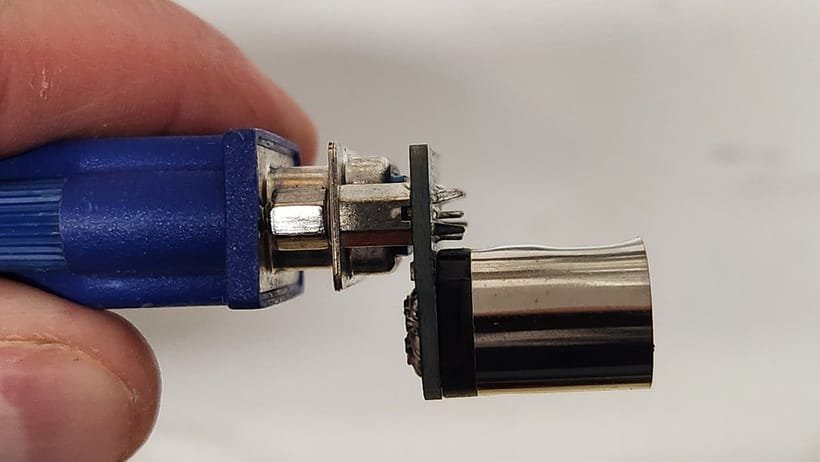
This is a composite RGB to VGA adapter. Curiously, I don’t seem to be able to find anything similar on eBay or Etsy at this time, although there are plenty of HDMI options.
I chose this adapter because I had a choice of two displays. One had HDMI, while the other had VGA and DVI. (Sadly, I don’t own a CRT.)
Plug and play (with wobble)
Hooking up the adapter to a VGA cable, then running that between the BBC Micro and my old DELL display worked a treat. Powering up, I could see the prompt almost instantly — it is insane how quickly old computers booted. (I’ve recently been playing with the MS-DOS emulator Faux86 on the Raspberry Pi and this is the same — there is no huge operating system to load first, you just switch it on and start typing.)
However, I do have some concerns surrounding the adapter. It isn’t inherently stable, the weight of the VGA cable is eventually going to cause some strain, I suspect. But until I find a new solution, it will do the trick.
I have the BBC Micro set up permanently at the moment, so there shouldn’t be any need to remove and replace the cable. So I’m expecting reasonably trouble-free connectivity while I focus on a few other “quality of life” improvements for the Beeb…
NEXT TIME: A look at the BBC Micro’s layout and ports.
Affiliate Disclosure: Some of the links in this post may be affiliate links, which means I may earn a small commission if you make a purchase through those links. This comes at no extra cost to you. Thank you for your support!

Christian Cawley is the founder and editor of GamingRetro.co.uk, a website dedicated to classic and retro gaming. With over 20 years of experience writing for technology and gaming publications, he brings considerable expertise and a lifelong passion for interactive entertainment, particularly games from the 8-bit and 16-bit eras.
Christian has written for leading outlets including TechRadar, Computer Weekly, Linux Format, and MakeUseOf, where he also served as Deputy Editor.
When he’s not exploring vintage consoles or retro PCs, Christian enjoys building with LEGO, playing cigar box guitar, and experimenting in the kitchen.