



GoldenEye 007 refuses to retire quietly. Nearly 30 years after it turned living rooms into split-screen battlegrounds, the N64 classic has just picked up a fresh new coat of paint thanks to a new 4K texture pack for PC emulation.
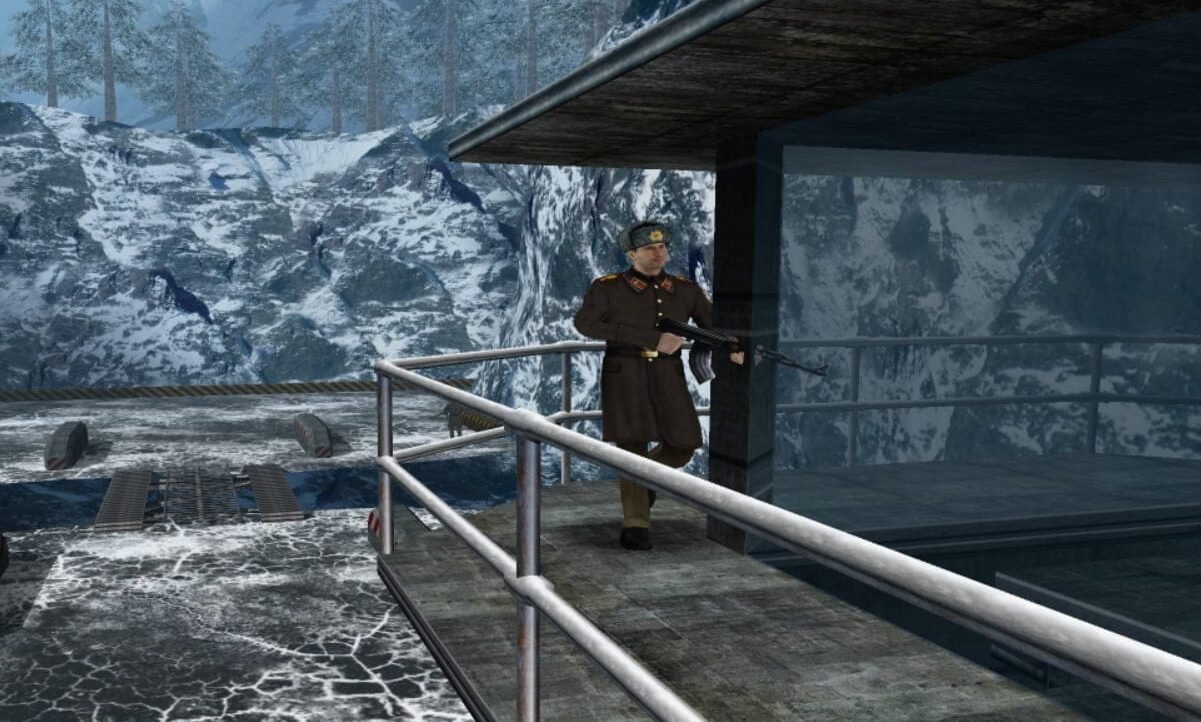
This visual upgrade of Rare’s original game keeps the look and feel of GoldenEye intact, while scrubbing away the blur and mud that came with late-90s console hardware. Walls, floors, props, signs, and environmental details have all been recreated in ultra-high resolution, making stages like Dam, Facility and Archives look cleaner than ever on modern screens.
You’re still looking at the same chunky geometry and unmistakable N64 proportions – but now with textures that don’t dissolve into soup when you stand close to them.
Check it out:
What the 4K texture pack actually does
The pack replaces large parts of the original game’s low-resolution textures with new 4K versions. That means:
- Sharper environments and surfaces
- Clearer signage and text
- Much better definition at higher resolutions
- A look that stays faithful to the original art style
It’s designed for N64 emulators that support external texture loading, typically using Project64 or Mupen64Plus with the GLideN64 video plugin. Drop the textures into the right folder, enable the setting, and GoldenEye suddenly looks like it’s had a deep clean.
Of course, guards still fold like cardboard boxes and Bond still runs like he’s wearing ski boots, but visually, it’s a huge step up from standard emulation.
The trade-off: nostalgia vs comfort
Here’s the catch: no matter how good the textures get, you’re still playing the original N64 version. That means:
- Old-school control schemes
- Emulator fiddling
- Quirks that were charming in 1997 and… character-building now
For some players, that’s part of the fun. Wrestling with the controls is half the nostalgia. For others, it’s the point where the idea of replaying GoldenEye starts to feel better than actually doing it.
Which brings us to the obvious alternative.
Or… just play the Xbox version on PC
If what you really want is to play GoldenEye rather than admire it, there’s a simpler route: the Xbox 360 version running through Xenia on PC.
This version gives you:
- Dual-stick controls
- Widescreen support
- High resolutions without texture mods
- A smoother, more modern feel
It doesn’t radically redesign the visuals, but it does make GoldenEye far easier to enjoy in 2026 without fighting the game every step of the way.
And if you want to go that route, you don’t need to guess your way through it.
I’ve already put together a full step-by-step guide on GamingRetro explaining exactly how to run the XBLA version of GoldenEye 007 on Windows using Xenia, from setup to troubleshooting.
So which should you pick?
- Want the pure N64 experience, just sharper?
Go with the 4K texture pack, available to download from the project’s GitHub. - Want to actually enjoy replaying GoldenEye without swearing at the controls?
Use the Xbox version via Xenia. - Alternatively, just play GoldenEye 007 on Nintendo Switch Online.
Either way, it’s hard not to smile at the fact that GoldenEye is still getting this kind of attention decades later. Whether you’re polishing the past with 4K textures or modernising it with better controls, Bond is clearly not done with us yet.
Affiliate Disclosure: Some of the links in this post may be affiliate links, which means I may earn a small commission if you make a purchase through those links. This comes at no extra cost to you. Thank you for your support!

Christian Cawley is the founder and editor of GamingRetro.co.uk, a website dedicated to classic and retro gaming. With over 20 years of experience writing for technology and gaming publications, he brings considerable expertise and a lifelong passion for interactive entertainment, particularly games from the 8-bit and 16-bit eras.
Christian has written for leading outlets including TechRadar, Computer Weekly, Linux Format, and MakeUseOf, where he also served as Deputy Editor.
When he’s not exploring vintage consoles or retro PCs, Christian enjoys building with LEGO, playing cigar box guitar, and experimenting in the kitchen.